Single vs multiple tenants
Most platforms offer some form of multi-tenant model, although few provide full logical isolation in a SaaS product.
What is a tenant?
A tenant is a fully isolated Qlik Cloud environment. It has its own users, data, applications, settings, and security boundaries. No data or user context crosses between tenants - Customer A’s tenant is completely separate from Customer B’s. Provisioning a new tenant is an API call; Qlik manages the underlying infrastructure, including scaling and disaster recovery.
When all your tenants share a single Qlik license, user assignments exist at the license level. This means a tenant admin may see users in their administration console who are licensed but have no membership in that tenant. Those users cannot access any data or content on the tenant - access still requires both tenant membership and a valid identity through the tenant’s IdP.
For technical details, see Platform Operations overview and the Qlik.com trust page.
Deployment options
Qlik’s terms of service require separate tenants for separate customer organizations:
When providing Qlik Cloud access to multiple organizations, it is required to utilize separate Tenants for each separate organization.
This means almost every production OEM deployment is a multiple-tenant deployment. The table below summarises the practical implications of each option:
| Approach | Data isolation | Customization per customer | Compliance support | Complexity |
|---|---|---|---|---|
| Multiple tenants | Complete | Full | Full | Medium |
| Single tenant | None | Limited | Limited | Low |
| Client-managed | Complete | Full | High | High |
Multiple tenants (Recommended)
In a multiple-tenant deployment, each customer receives their own isolated Qlik Cloud environment. Provisioning is automated via the Platform Operations APIs - when a customer signs up, your automation creates their tenant, configures their identity provider, deploys their application templates, and sets up monitoring, all without manual intervention.
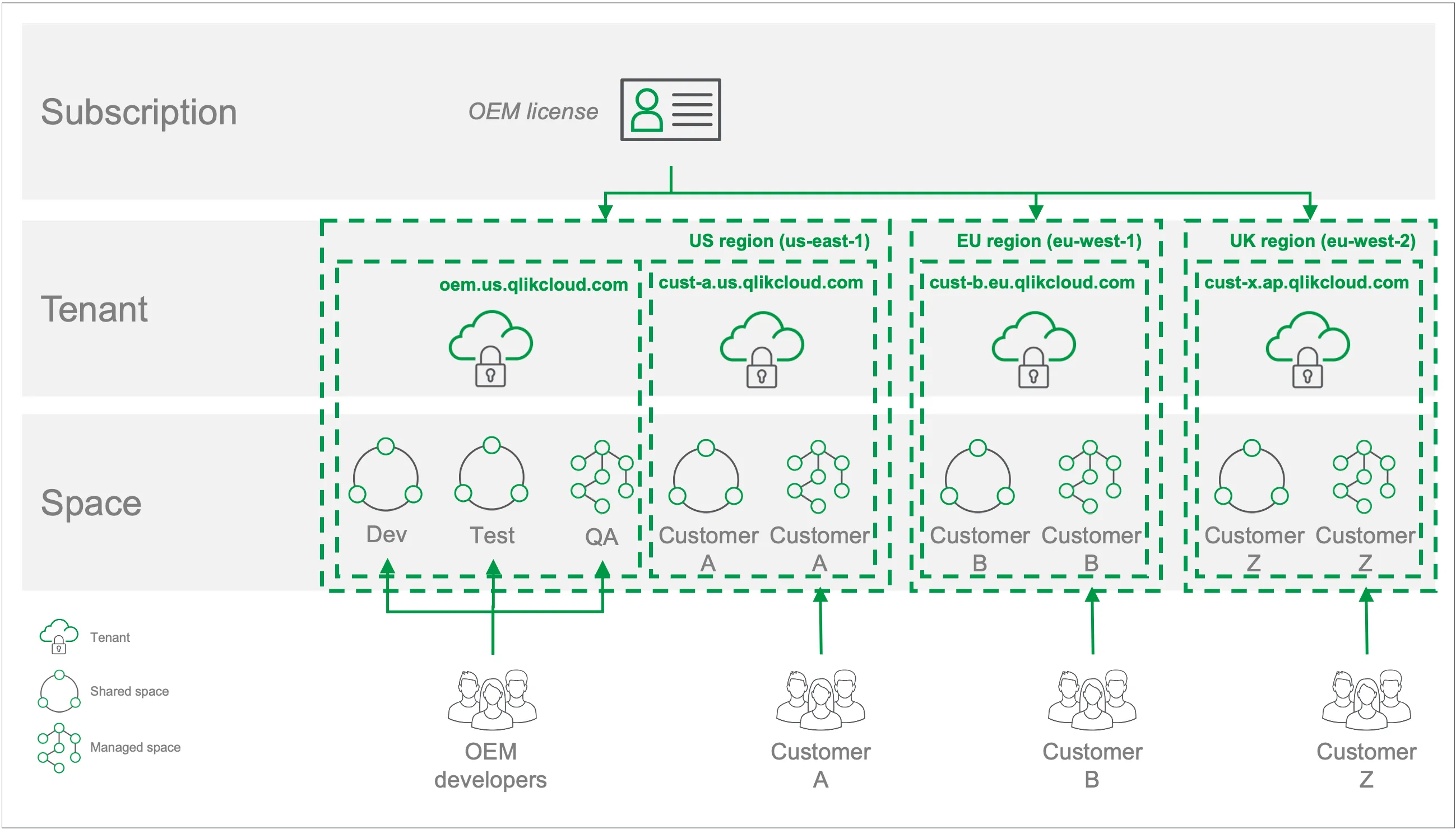
Because each tenant is completely separate, you can configure per-customer branding, regional deployment (matching data residency requirements), and custom feature sets. Offboarding is equally clean: deactivating a tenant via API removes that customer’s data and access. Each license permits up to 8,500 tenants per region, so scaling to large customer bases does not require a new subscription tier - only automation capable of managing tenants at that scale.
A typical multiple-tenant setup looks like:
oem.us.qlikcloud.com- your development, test, and staging tenant (on a separate subscription to protect production entitlements)customer-a.us.qlikcloud.com- Customer A’s analytics (US region)customer-b.eu.qlikcloud.com- Customer B’s analytics (EU region)customer-c.uk.qlikcloud.com- Customer C’s analytics (UK region)
When tenants span multiple subscriptions or regions, use an organization-level OAuth client to retrieve a single, filterable list of all your tenants across every subscription from one API call. This gives your provisioning and management automation a reliable starting point for targeting the right tenant, rather than querying subscriptions one by one.
Single tenant (Limited use cases)
In a single-tenant deployment, all customers share one Qlik Cloud environment, separated only by spaces and access controls - not by isolated environments. This eliminates the per-tenant provisioning overhead, but it comes with significant practical constraints.
All users in the tenant can, by default, see each other’s names and email addresses. The data is nominally separated by space permissions, but there is no cryptographic or infrastructure boundary between customers. A misconfigured permission or a future product change could expose one customer’s data to another. This makes single-tenant deployments unsuitable for any scenario involving personal or business-sensitive data.
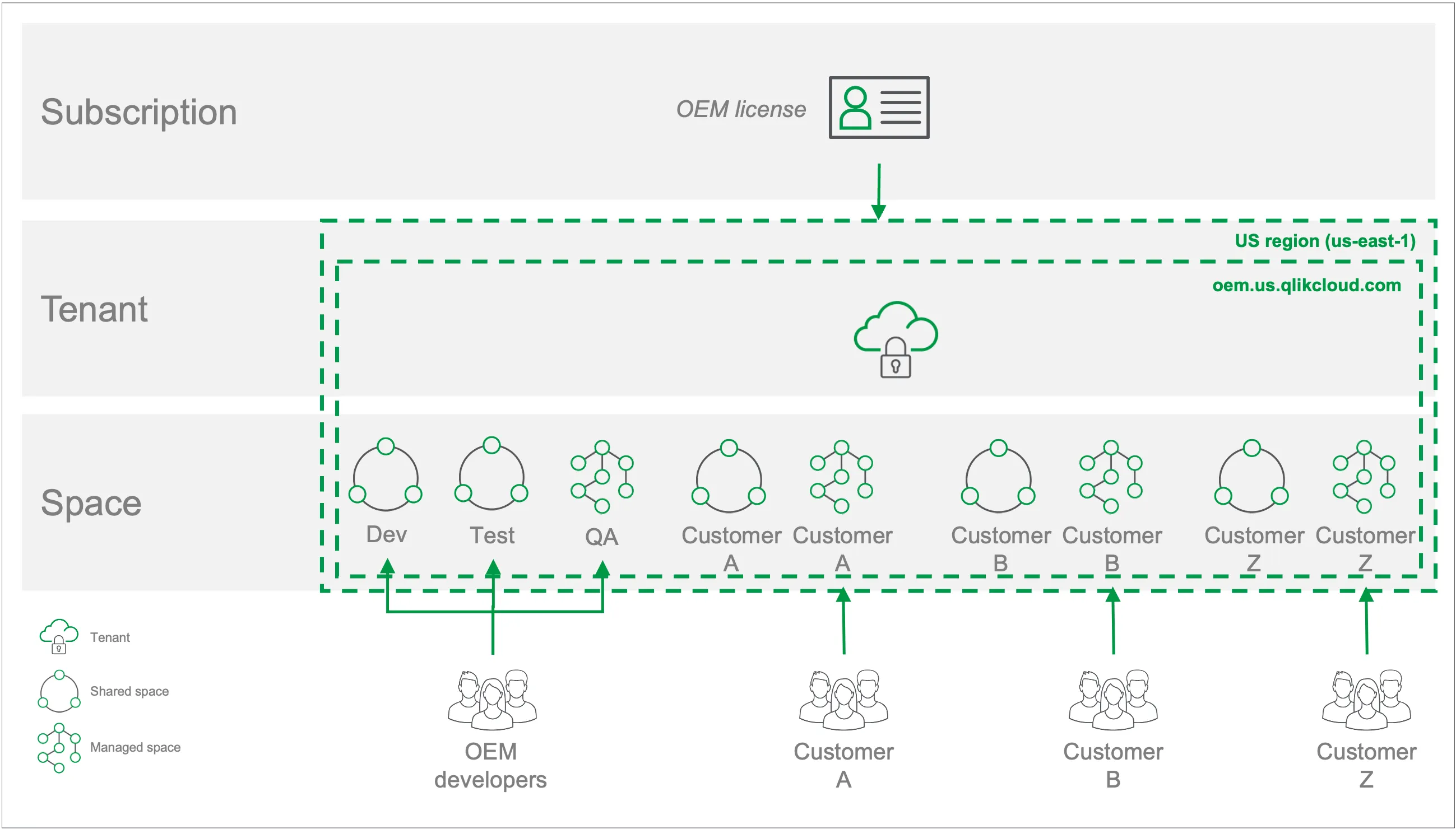
In this example, a single tenant (oem.us.qlikcloud.com) serves three customers alongside
the OEM’s development and testing teams. Each customer has a shared space for development access
and a managed space for production content. This topology only works when:
- All users are anonymous (no personal information stored or processed)
- No data residency or encryption requirements apply
- The customer count is small (fewer than 10)
- All customers need identical functionality with no per-customer customization
If you use a single-tenant deployment, configure it to minimize risk: turn off collaboration features to prevent cross-customer communication, use dummy email addresses, embed the experience to reduce access to native tenant interfaces, and stage content in shared spaces for consumption from managed spaces.
Client-managed hybrid
Qlik Sense Enterprise Client-managed is self-hosted software that provides the core Qlik Sense analytics capabilities without the cloud-native features: no collaboration, automation, alerting, reporting, AI, or data integration. It is an option for customers with data residency or security requirements that Qlik Cloud cannot meet - for example, regions where Qlik Cloud is not available, or compliance environments requiring full customer control of data infrastructure.
Client-managed has a fixed release schedule rather than Qlik Cloud’s continuous delivery cadence, which can delay access to new capabilities. It also requires you to provide your own automation tooling for deployment and lifecycle management - the Platform Operations APIs used for Qlik Cloud do not apply to client-managed. Most Qlik Sense visualizations are compatible across both platforms, but advanced features requiring cloud-native components (direct query to database, AI helpers) are not available client-managed.
If you are building a hybrid deployment across Qlik Cloud and client-managed, the qlik-embed, @qlik/api, and qlik-cli toolkits support both platforms. Authentication patterns and method support differs between them.
Next steps
Ready to continue? → Learn about access methods